App live on iPhone & Android Patent pending

Every restaurant you run, live in 3-D on the table in front of you.

QSR Inspector reads the cameras your stores already have, turns what happens into anonymous events on a small box in the store, and rebuilds each restaurant as a live, table-size 3-D model you can look into from your living room or office. Every person is a faceless avatar. Every station is green, yellow, or red. Ask “why is this red?” and get an answer tied to what actually happened. That 3-D view is Heliarch by QSR Inspector, patent pending.

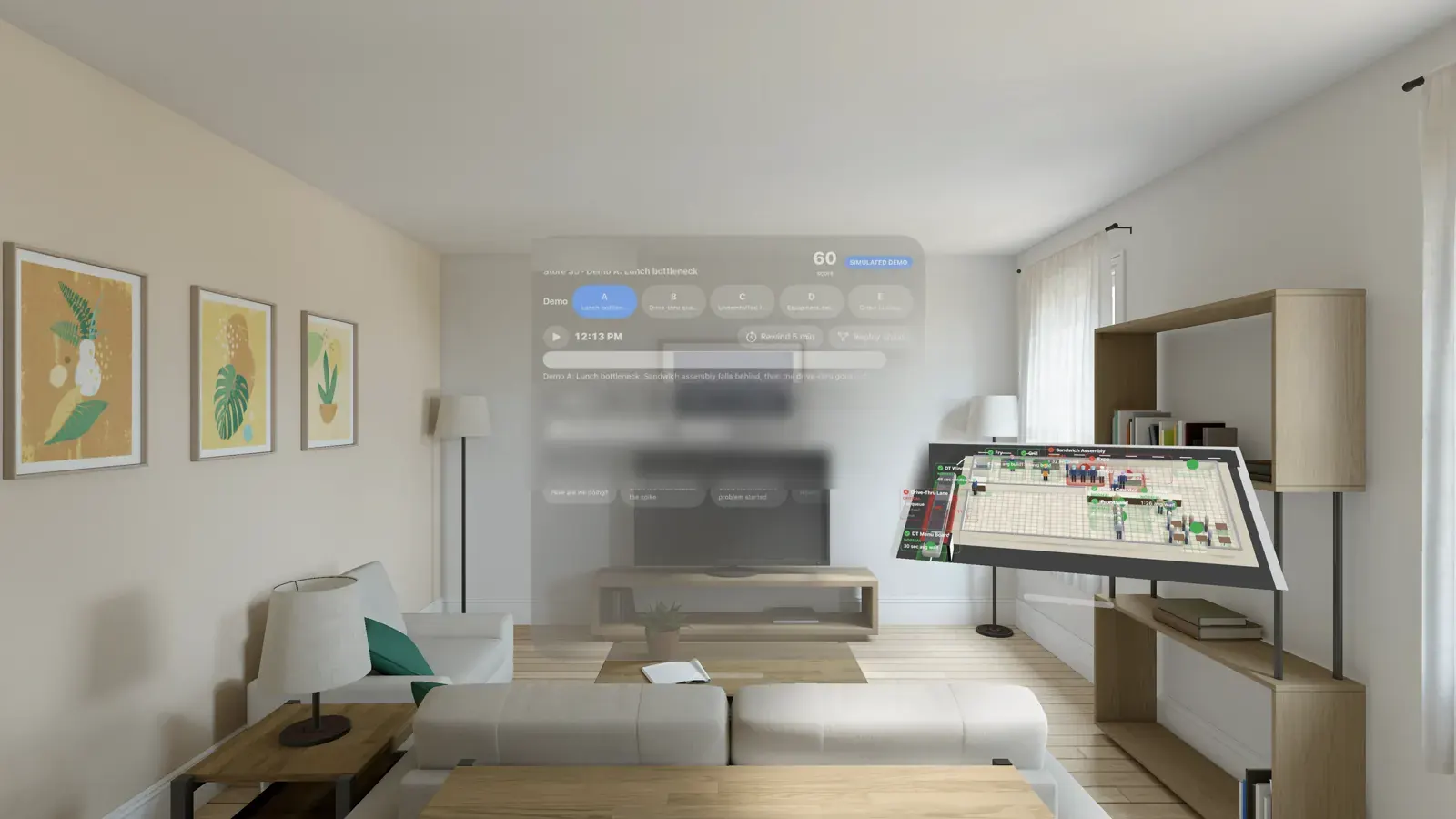
A table-size 3-D model of a restaurant floating in a living room beside a control panel, as seen through Apple Vision Pro
Apple Vision Pro simulator. Native app in development; demo store with simulated activity.
One business, three layers

An app your managers use today.
A camera brain in every store.
A 3-D view of all of it.

Each layer works on its own, and each one makes the next one smarter. Here is exactly where every piece stands.

The app

QSR Inspector

Live · App Store & Google Play

Digital inspections, AI coaching, food-safety logs, corrective actions, and multi-store reports, built by a 20-year restaurant operator.

  • 100-point inspections with photo proof
  • AI action plan after every visit
  • Owner, district, and store-manager views
What the app does →
The eyes

QSR Vision

Live · pilot stage

A small NVIDIA edge box that plugs into the cameras a store already has. It runs the AI on site and sends out events: queue length, station timing, waits, walk-aways. Video stays in the store by default.

  • Live KPIs and alerts, timestamped
  • Morning incident report for every store
  • Remote fleet updates, no truck roll
How Vision works →
The view

Heliarch

Working · Vision Pro in development

Any of your restaurants as a live 3-D model you can set on a table and look into from anywhere, with faceless avatars, green/yellow/red zones, a 7-day replay, and plain-English answers.

  • Runs in the Meta Quest 3S browser today
  • Native Apple Vision Pro app in development
  • Glasses support built and planned
The full story →
  1. 1 · See

    Your existing cameras

    Vision starts with the cameras a store already has. More cameras simply cover more of the floor.

    In the store
  2. 2 · Understand

    Vision box

    AI on site turns video into anonymous events. Positions, queues, timings. No faces, no names.

    In the store
  3. 3 · Score

    Live store state

    Every zone gets a status: green, yellow, red, or grey when there's no data. One record feeds every screen.

    Secure cloud
  4. 4 · Act

    The app

    Alerts, the morning brief, coaching, and the fix routed to the right manager.

    Your phone
  5. 5 · Look inside

    3-D model

    The same live state, drawn as your store with avatars. Rewind any moment from the last 7 days.

    Headset or browser
Heliarch · the 3-D store

Pull up any store. See what every person is doing right now.

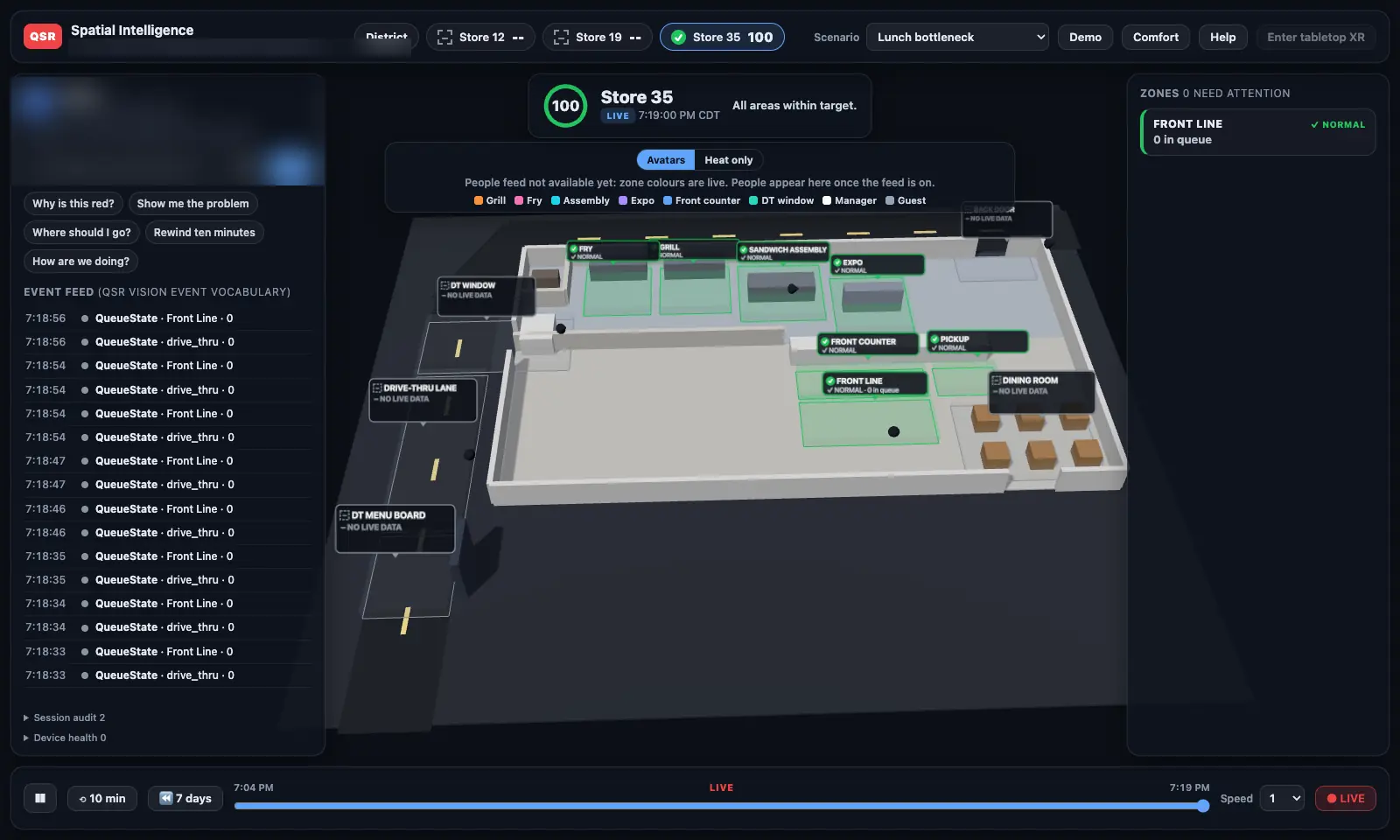
A district manager can't be in twelve kitchens at once, and flipping between camera feeds doesn't tell you much. Heliarch puts the whole restaurant on the table in front of you, drive-thru, front counter, kitchen, and dining room, moving live.

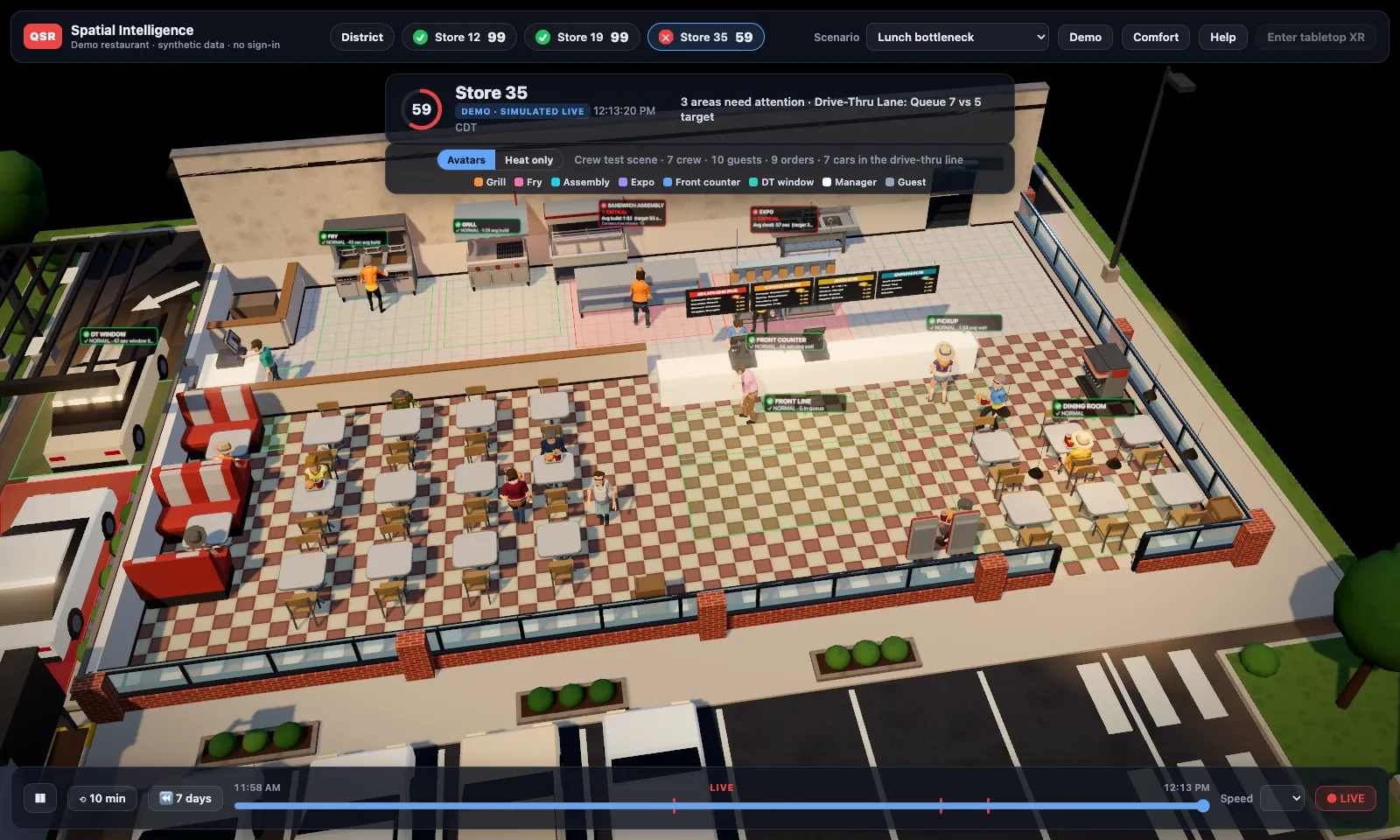
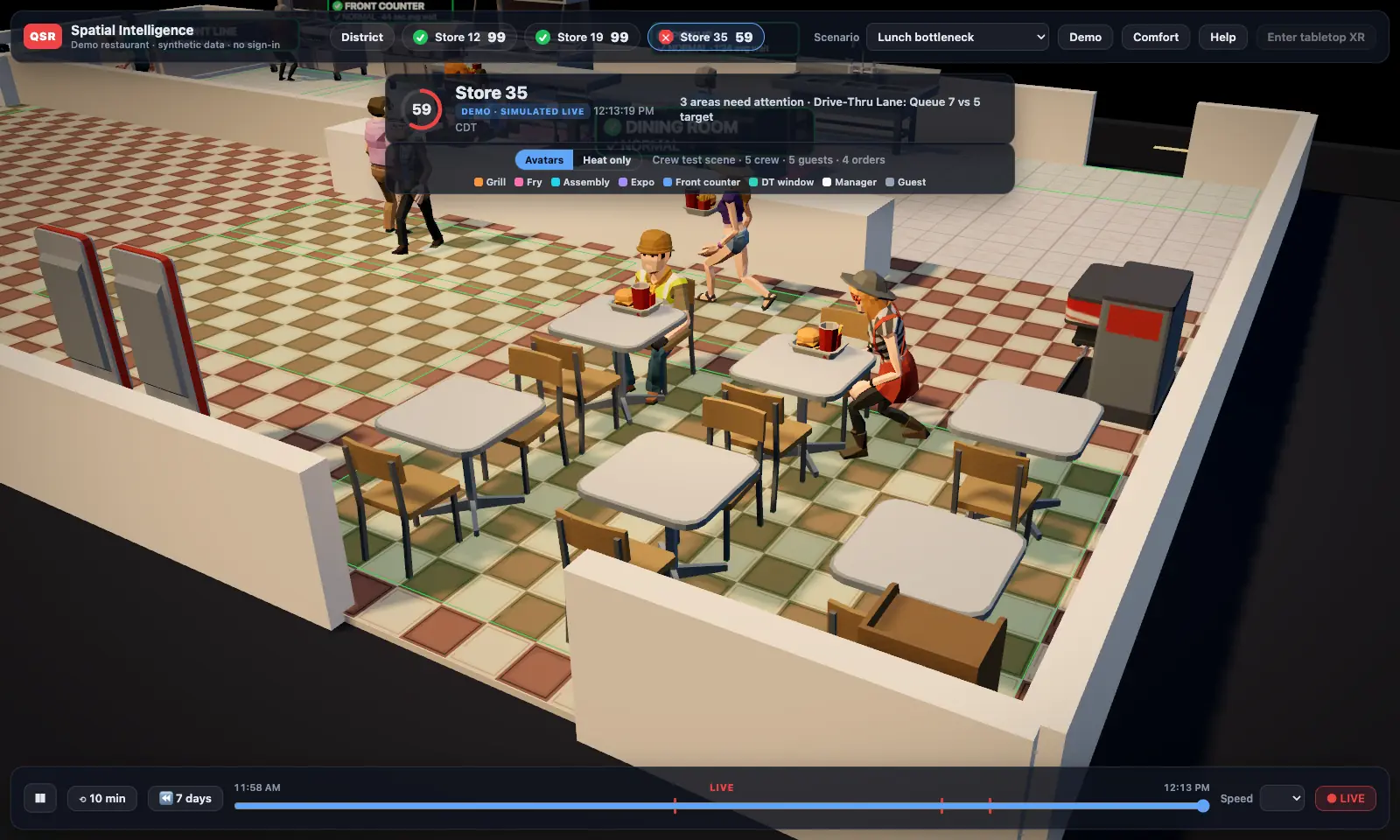
Demo · simulated
Walk around the store. The lunch crew at work, from above. Demo store, simulated activity.
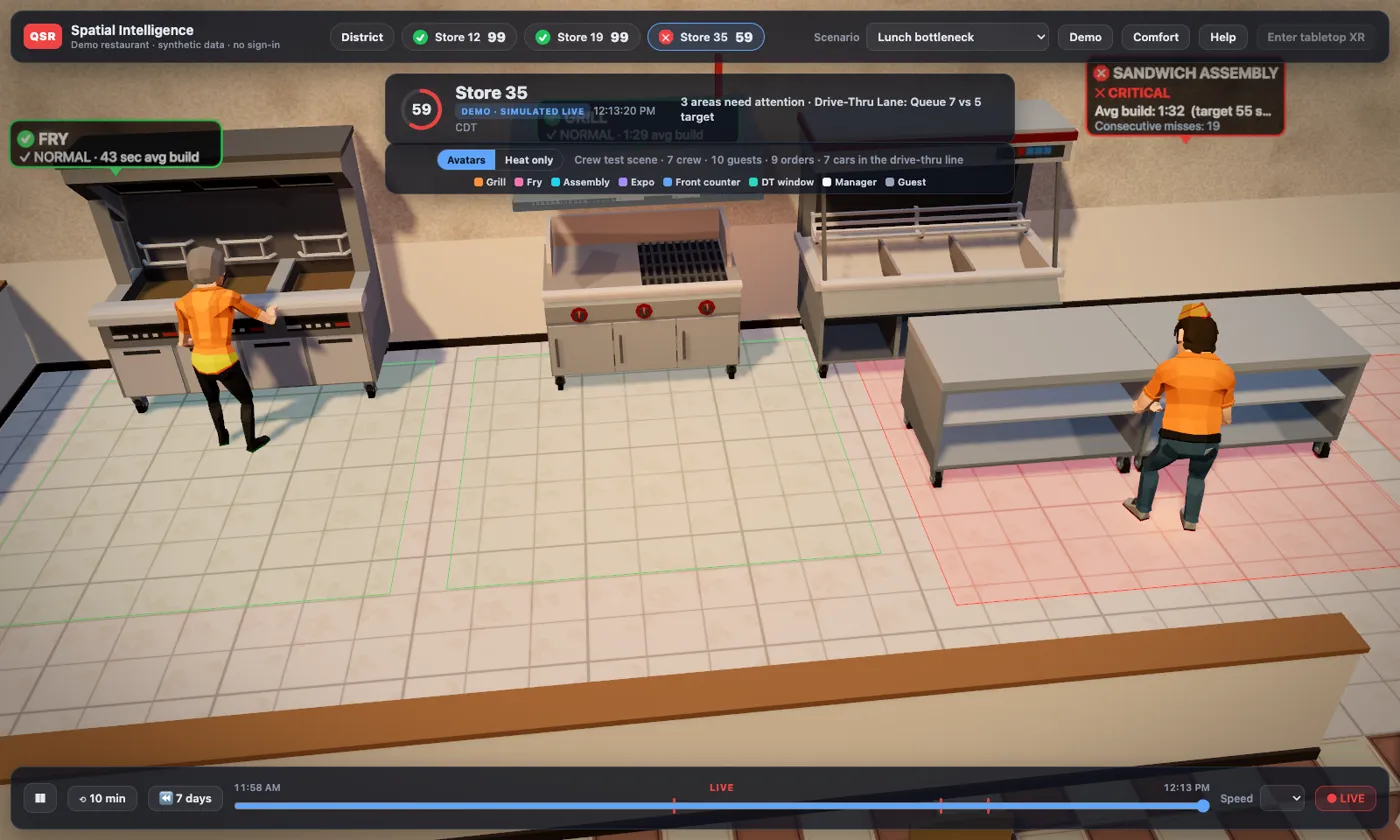
Demo · simulated
Kitchen close-up. Every station carries its own live status. Simulated.
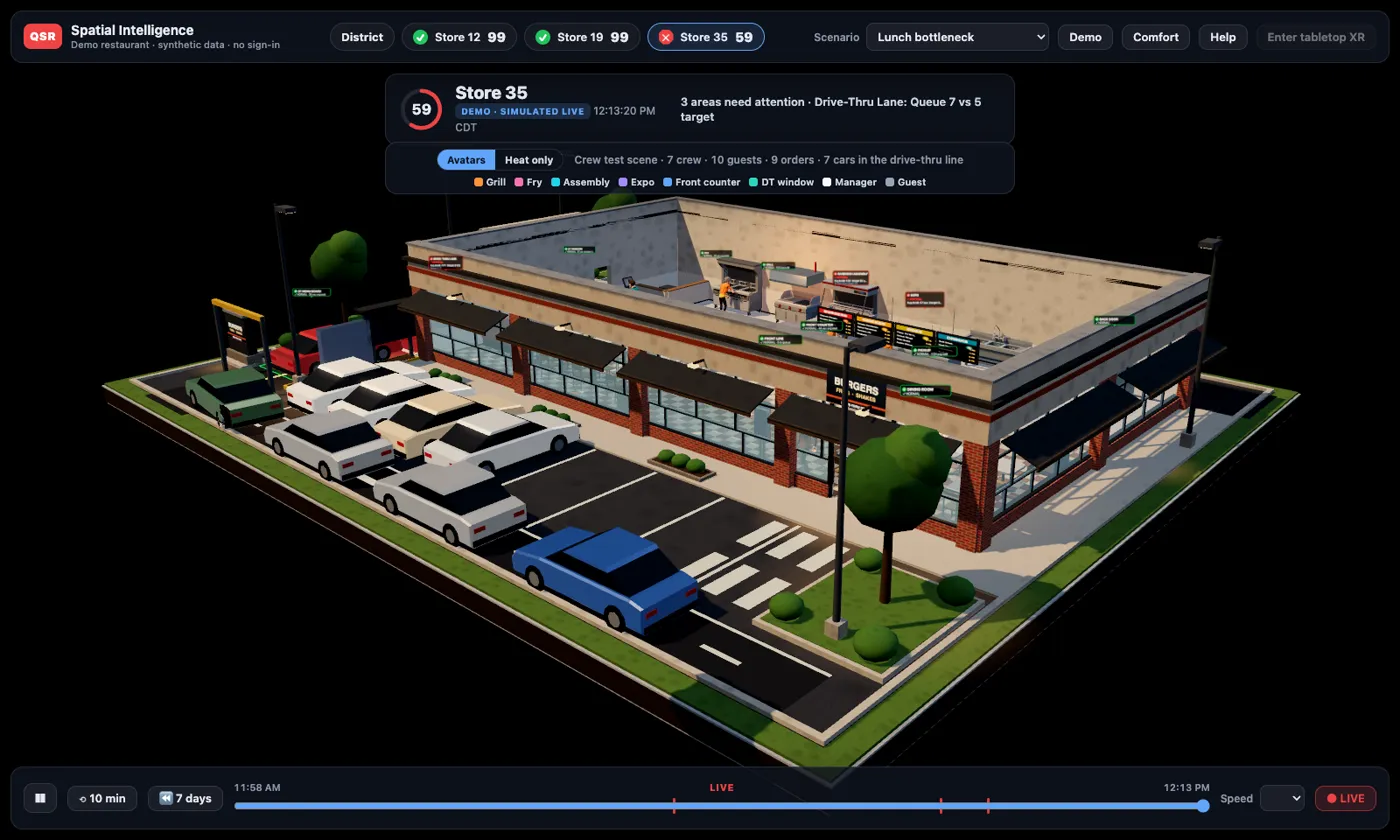
Demo · simulated
Drive-thru line. The lane, the menu board, and the window. Simulated.
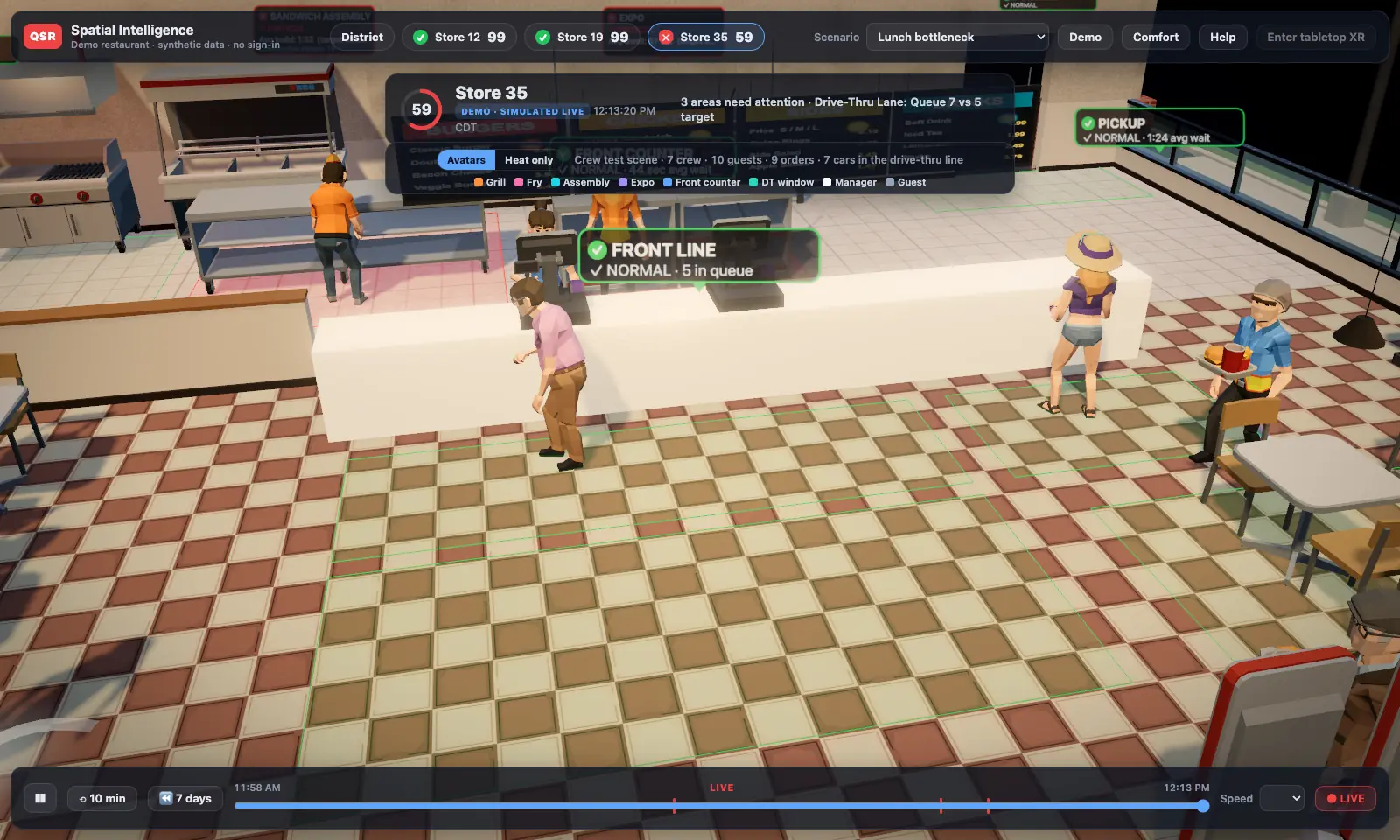
Demo · simulated3-D front counter with faceless guest avatars in line
Front counter. Simulated.
Demo · simulated3-D dining room with guest avatars at tables and booths
Dining room. Simulated.
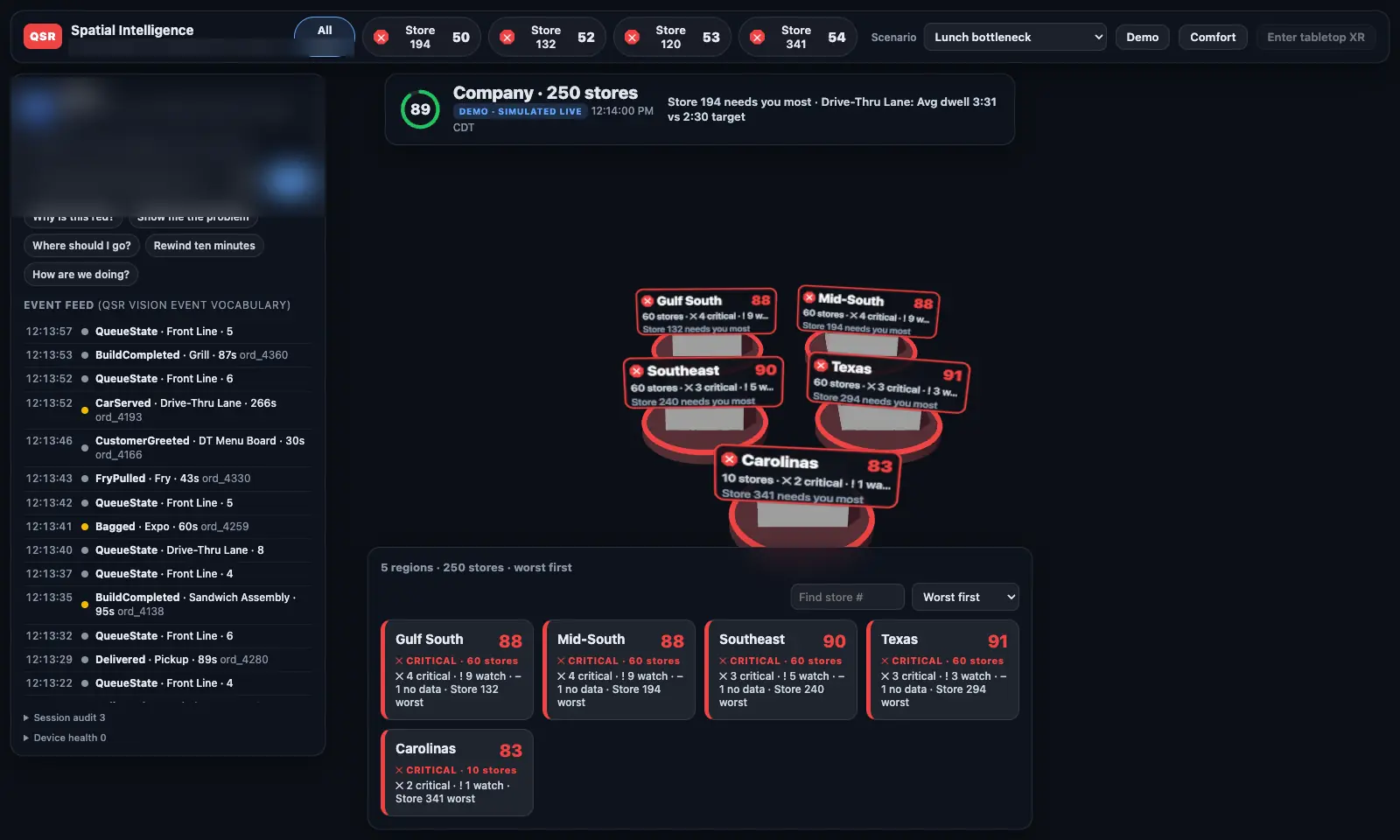
Demo · simulatedCompany view of 250 demo stores grouped by region, worst first
250 stores, worst first. Demo data.

More pictures and video on the Heliarch page →

Table-size, anywhere

Set your restaurant on the coffee table or the desk and walk around it. Pull up a different store with a tap.

Faceless avatars

Every person in the store shows up as a generic figure, colored by role (grill, fry, front counter). Never a face, never a name.

Green · yellow · red zones

Each station is scored against your own targets, live. Grey means “no data”, so a missing camera never looks like a good shift.

7-day replay

Rewind any moment from the last week. Jump straight to the worst moment of the day, then play it at 1–60× speed.

“Why is this red?”

Ask out loud or tap. An AI assistant answers from the store's own events: what happened, since when, the likely cause upstream, and the volume.

Private by design

The 3-D view never receives camera video, only anonymous positions and events. On pilot boxes, anonymous IDs change at least every 5 minutes. Raw anonymous position data is kept up to 30 days, then deleted automatically.

Real bench data
Real camera events, not a simulation. 27 minutes of an evening from our test kitchen's cameras (Oct 7, 2026), sped up about 23×. The pickup area goes red, eases to yellow, then goes red again from real customer wait times.
Proven on real data

A real wait turned the zone red in about 2 seconds.

On October 8, 2026 we ran the full chain end to end on real events from our camera test bench: cameras → Vision box → cloud → 3-D model. A customer waited too long at pickup, and the pickup zone turned red on screen about 2.3 seconds after the event, typical (median) end to end.

The same day, the live store-status service went into production. This is the layer every 3-D view reads from.

On target Watch Needs attention No data
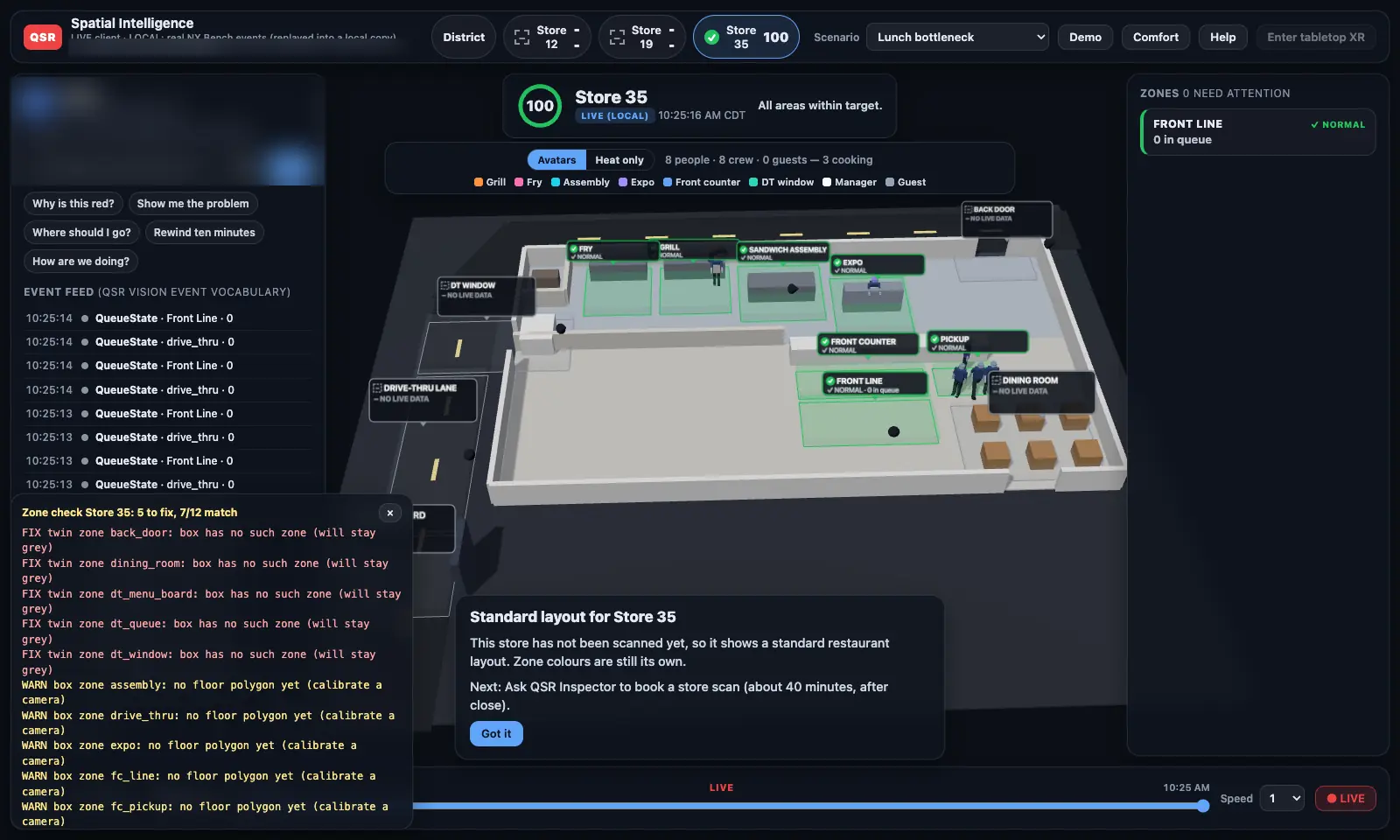
Real bench data3-D store beside a zone check report from the test bench
Zone check against the test-bench Vision box.
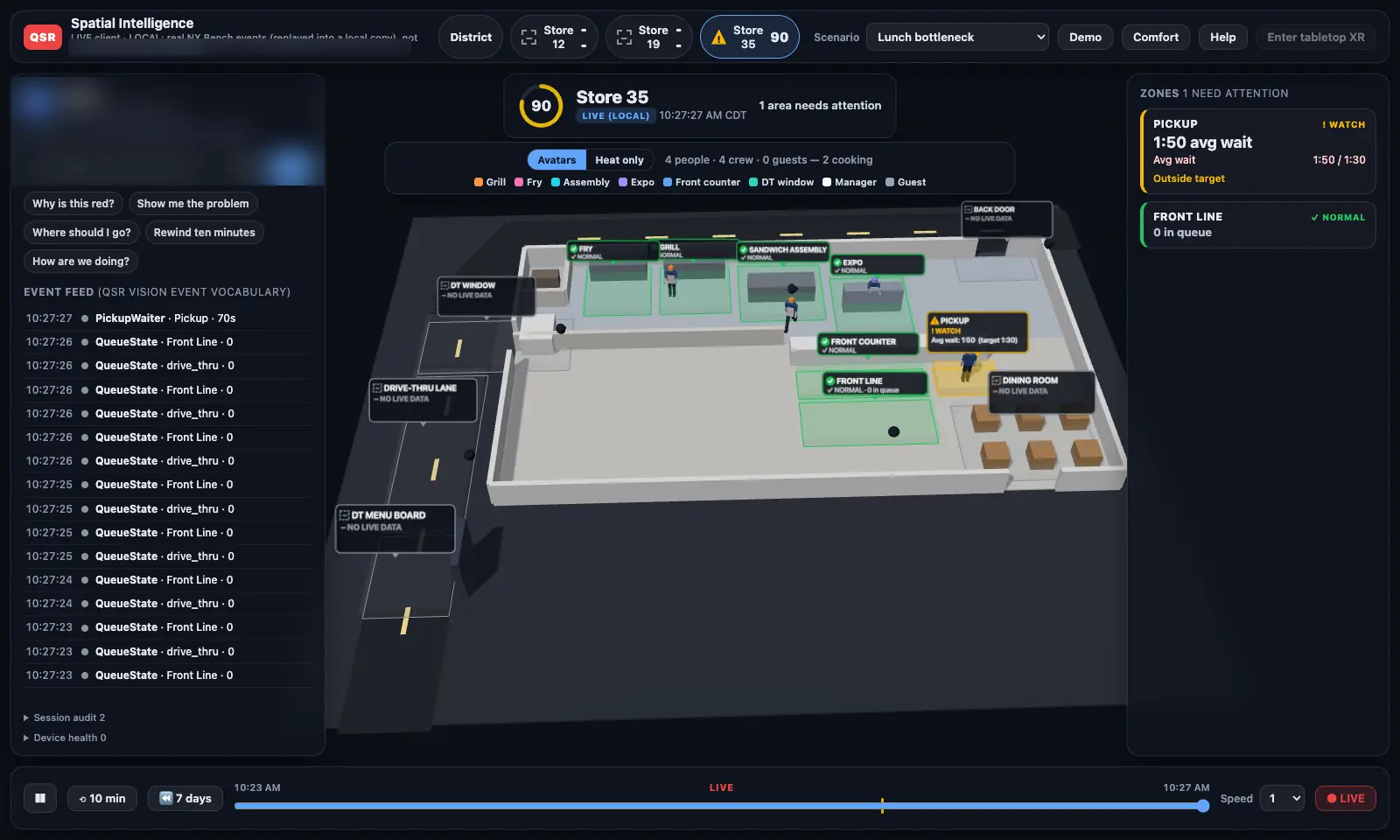
Real bench data3-D store from real events: pickup on watch at a 1:50 average wait
Pickup on watch from real waits.
Real bench data3-D store fed by the production store-status service, all zones within target
Production feed, Oct 8, quiet evening.
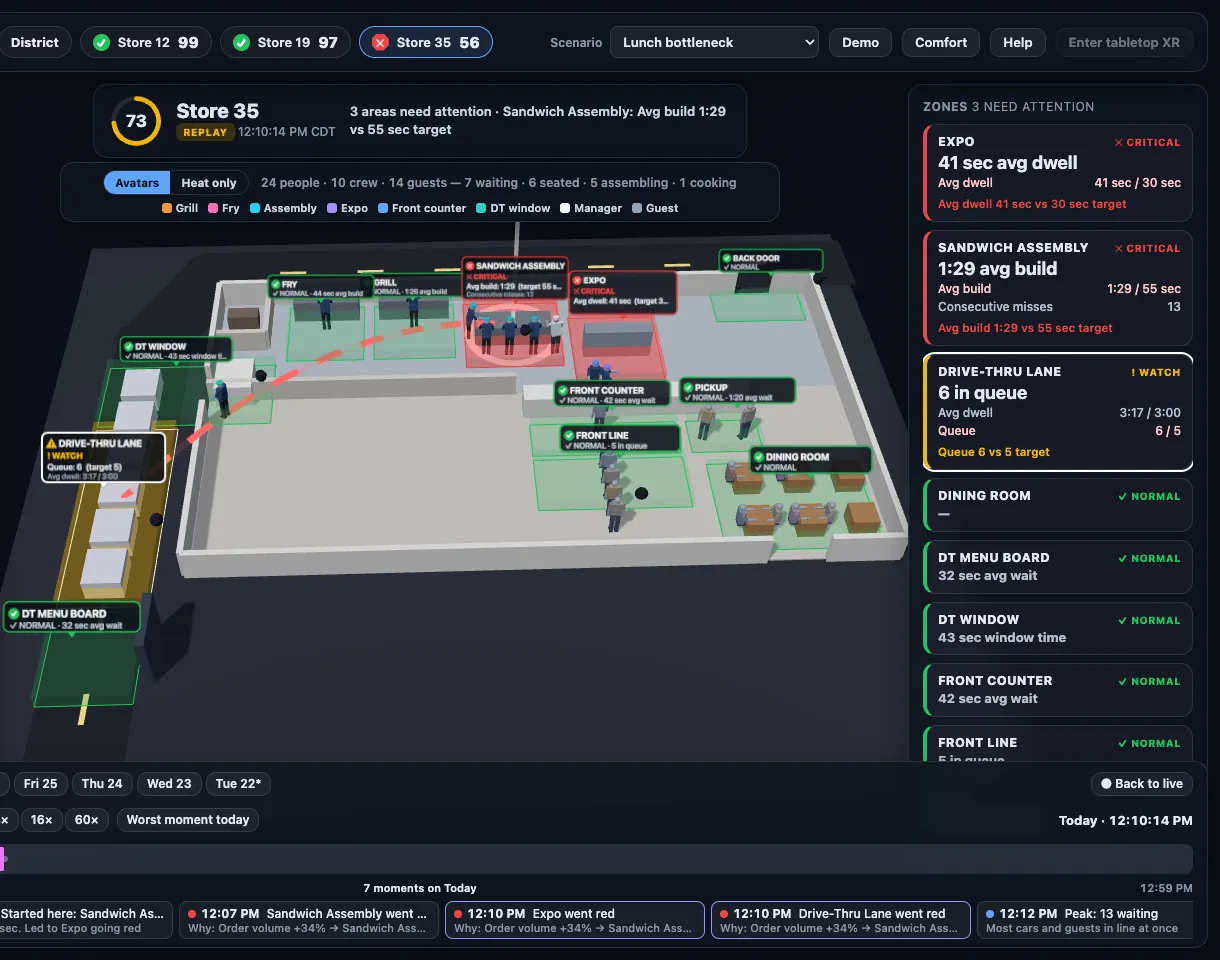
Demo · simulated3-D store in replay mode with a red line drawn from the overloaded sandwich assembly station to the backed-up drive-thru lane, and a 7-day timeline of red moments below
Cause → effect, drawn in the store. Replay from the 7-day timeline: sandwich assembly falls behind, then the drive-thru backs up. Demo store, simulated activity.
Ask why

Not just that it's red. Why it's red.

Answers come from an AI assistant, and every answer is built from the same event record that drives the live view and the replay, so what you're told always matches what you can watch.

“Why is the drive-thru lane red?”
What
Queue is 8 cars against a 5-car target; average time 4:19 against 3:00.
Since
12:09 PM, when the queue reached 6.
Likely cause
Upstream at sandwich assembly: average build 1:33 vs. a 55-second target, 20 orders in a row over, since 12:05 PM.
Volume
Orders up about 34% at 12:00 PM.

Example answer from the lunch-rush demo scenario (simulated data).

Where you'll see it

Headset, glasses, or just a browser.

One live store model, drawn on whatever you have. Each status below is exactly where it stands today.

Working today

Meta Quest 3S

Runs in the headset's web browser with color passthrough. Your store sits on your real table; select with your hands, no controllers.

In development

Apple Vision Pro

A native app with a premium look: tabletop or floating store, the 7-day replay with people, district overview, and the privacy promise up front.

Built · in testing

Ray-Ban Meta glasses

Hands-free, voice-first: start a session and ask what you're looking at. Integration built with Meta's wearables toolkit and in internal testing.

Planned

Meta's display glasses

A target platform. The tabletop store is being designed to fit lighter, everyday headsets and glasses as they become available.

Working today

Desktop browser

No headset? The same 3-D store, replay, and answers run in a regular computer browser. Every screenshot on this page outside a headset is from it.

Live

iPhone, iPad & Android

The QSR Inspector app: alerts, the morning brief, inspections, and Shift Rewind, the in-app 3-D replay.

Headset emulator · demo
Meta Quest 3S tabletop (headset emulator capture, demo store).
Vision Pro simulator
Vision Pro: premium look and 7-day replay (simulator stills, in development).
Demo · simulated
Exterior orbit in a desktop browser. No headset needed. Simulated.

Meta Quest, Ray-Ban Meta, and Apple Vision Pro are trademarks of their owners. QSR Inspector is not affiliated with or endorsed by Meta or Apple.

What's built

Four months, three products, real stores next.

  1. June – July 2026

    QSR Inspector app launches

    Inspections, AI coaching, and food-safety logs on the App Store and Google Play; subscriptions live July 2026.

  2. July – September 2026

    QSR Vision on real cameras

    Edge AI box detecting on live store cameras (July), Shift Rewind 3-D replay in the app, the “why” engine and morning incident report, and over-the-air fleet updates (September).

  3. September 29, 2026

    Heliarch begins

    Tabletop store in the browser and headset, faceless role-colored avatars, district view, 7-day replay, and cause-and-effect replay within days.

  4. October 7, 2026

    Vision Pro + realism pass

    Native Apple Vision Pro build plays a full day of replay with people; lighting, kitchen, and exterior look pass.

  5. October 8, 2026

    Real events, end to end · patents filed

    Real camera events turned a zone red in about 2.3 seconds; live store-status service in production; two U.S. provisional patent applications filed.

What's next

The road from test kitchen to your living room.

Next

Multi-store pilot

A first pilot with a multi-unit franchise operator is being planned.

Then

Install

Vision boxes on each pilot store's existing cameras, calibrated to each floor plan.

Then

Store scans

Phone 3-D scans of each pilot store, so the model looks like that restaurant, not a template.

Then

Heliarch live

Live avatars and the 7-day replay running on real pilot stores.

Then

Glasses

Vision Pro release, then lighter glasses as platforms ship.

Order is firm; dates depend on the pilot. Full roadmap and long-term vision →

Patent pending

Our own inventions, on file.

Two U.S. provisional patent applications were filed in October 2026, covering how we turn store cameras into a private, live 3-D view of operations, among other work.

Partnership inquiries
QSR Vision · the camera brain

Your cameras already see everything.
Vision tells you what it means.

A small NVIDIA edge box in the store reads the cameras you already own. It answers what a DVR, a POS, and a manager's memory can't: who, what, when, where, and why, and then what it cost and how to fix it.

QSR Vision live 3-D twin of a restaurant with drive-thru, kitchen, front counter, and dining room plus a strip of live KPIs
Shift Rewind, the 3-D replay inside the QSR Inspector app.
  • Live KPIs by camera, not clipboard. Speed of service, drive-thru times, queue length, station timing, and staffing, timestamped as they happen.
  • An incident report every morning. For every store: what happened, when, where, the inferred why, and the fix. Always stations, never names.
  • Priced in your own numbers. Walk-aways and slow periods valued from your store's own average check and margin, not a brochure figure.
  • Loss prevention. Flags for drawer, register, and shelf activity worth a second look, sent to a review queue.
  • Private by design. Video stays on the box in your store by default; events are what leave. Short clips are shared only if the owner turns on remote clip access.
  • Runs itself. Remote health, over-the-air updates, and automatic rollback across the whole fleet.
THE INCIDENT REPORT · written every morning, for every store
12:40 PM · Drive-thru backed up 8 deep, 14 min
WHO: sandwich station 30% slower than normal · register 15% slower
WHAT: 25-sandwich order rung 12:38 · rush 30% heavier than a normal Tuesday
WHEN: began 12:40 PM · first car gave up 12:47 PM · cleared 12:54 PM
WHERE: sandwich station → window 2
WHY (inferred): large order never called to the line
COST: 3 walk-aways · ~$41 · FIX: call large orders the moment they're rung
Sample report. Every number comes from the store's own events. WHY is always labeled inferred. Stations, never names.
Find your why: the Vision idea in 90 seconds. Sound on.
Privacy & cameras

We measure the restaurant, not the people.

QSR Vision is anonymous, zone-level operations analytics: drive-thru times, queue lengths, wait times, and how work flows between stations.

No face recognition

Nothing identifies who a person is. No faces, no names, no emotion reading.

No scores on individual employees

Vision does not score, rank, or evaluate individual workers. Reports and alerts are about stations, lanes, and stores.

Video stays in the store

The box turns video into anonymous events on site. Short alert clips stay on the box unless an admin turns on remote clip viewing or shares one, and shared clips expire after 14 days.

A person reviews, never the machine

Loss-prevention flags go to a manager's review queue. The system never makes a disciplinary decision.

How pilot boxes work (the release we're testing now, coming with the pilot): the anonymous ID for a person on camera changes at least every five minutes, no tracking IDs or body points leave the box, alert clips are deleted from the box after seven days, raw anonymous position data is deleted from the cloud after 30 days, and every pilot store posts an employee notice before its box goes live.

QSR Inspector · the app

A district manager in your pocket.

Every visit becomes a scored, coached, tracked record, so issues actually get fixed. Free 14-day trial, no credit card.

AI inspection report with strengths, coaching tip and action plan
Inspection checklist with live score
Multi-store reports dashboard

100-point inspections

Six categories, instant pass/fail scoring and letter grades, photo proof on any item.

AI coaching

Strengths, a coaching tip, and a prioritized action plan after every inspection.

Corrective actions

Failed items become tracked tasks with owners, priorities, and due dates.

Food-safety logs

Temperature logs and open/close checklists with out-of-range flags and an audit trail.

Ask your COO · AI assistant

Plain-English questions (“which store needs me first?”) answered by an AI assistant from your own data, with the number that proves it.

Owner intelligence

QSR Score™, the AI executive brief, Daily Game Plan, Profit Ledger™, and Equipment Watch.

Get started free

Start with the app tonight.

Begin with digital inspections and AI coaching today; add QSR Vision when you're ready to see what the cameras already know.

Free 14-day trial · no credit card · iPhone · iPad · Android
Pricing

Simple pricing that scales per location

“Great restaurants aren’t built by chance—they’re built by great leaders. My mission is to help create them.”
— Randy Dickson, Founder
QSR Inspect · software

Digital inspections, AI coaching, food-safety logs, and multi-store reporting.

Save with annual — 2 months free
Starter
$19.99 /month
One location. Every feature included — a digital record of every inspection, photo proof, and AI coaching that tells you exactly what to fix. Start free for 14 days, no card required.
Start free trial
MOST POPULAR
Pro
$29 /location / month
Two or more locations. Everything in Starter, plus cross-store reporting, rankings, and a weekly AI executive summary across your whole network. Unlimited team members. 14-day free trial.
Start free trial
★ QSR Inspector Vision · flagship

Founding introductory offer — your first 12 months. Vision includes everything in Inspect, plus AI cameras, a live digital twin, real-time KPIs, and loss prevention. 12-month term. Required Vision hardware must be purchased separately; hardware is not included in the software subscription.

Locations 1–9
$29.99 /location / month
First nine locations. Put a District Manager on the line at every store — live KPIs, speed-of-service, coaching, and loss prevention.
Contact Us
FOUNDING OFFER
Locations 10–50
$24.99 /location / month
Each additional location from 10 through 50. Standardize execution across your region with live operational visibility and coaching.
Contact Us
Locations 51–100
$22.99 /location / month
Each additional location from 51 through 100. Extend your operational intelligence platform across your network.
Contact Sales

Graduated pricing: each location is charged at the rate for its band; adding a location does not reprice earlier locations. Contact sales for 101+ locations. Founding rates apply to each customer's first 12 months; renewal pricing will be quoted and agreed in writing. Required hardware is purchased separately. Prices in USD. Inspect billed monthly or annually and cancel anytime; Vision is quoted and installed with you directly.

Heliarch is in pilot and not yet sold separately. Ask us about joining a pilot.

Our story

A letter from the founder

Randy Dickson, award-winning General Manager
Randy Dickson — award-winning General Manager & multi-unit operations leader

For more than 20 years, I have dedicated my career to mastering restaurant operations and leadership. Throughout that journey, I have been honored as an award-winning General Manager and have advanced through every level of leadership—from District Manager to Regional Director of Operations.

Having worked on both sides of the business, I recognized a common challenge: the disconnect between field leadership and restaurant management. Too often, General Managers lack the coaching, guidance, and consistent feedback needed to reach their full potential.

That realization inspired me to create this platform.

Read the full letter

Built with the power of AI and backed by decades of real-world operational experience, this app was designed to revolutionize the way restaurants teach, train, and develop leaders. Think of it as having a District Manager in your pocket—available anytime, anywhere.

With a simple inspection, the platform handles the rest. Owners and leaders gain instant visibility into detailed notes, photos, key performance indicators, and actionable coaching opportunities. Managers receive clear guidance on what needs attention and how to elevate their restaurant's performance to the next level.

More than an inspection tool, this is a leadership development system. It creates accountability, drives consistency, and empowers managers to become true operational rockstars.

I have poured my heart and soul into building this platform because I believe great restaurants are built by great leaders. My mission is simple: to provide operators with the tools, insights, and coaching they need to develop stronger teams, deliver exceptional guest experiences, and achieve lasting success.

I am confident that organizations committed to using this system will see measurable improvements in execution, leadership development, and overall restaurant performance.

My vision has never been to replace managers with artificial intelligence. It is to give every manager access to the insight, coaching, and operational support that only the very best leaders could once provide.

I believe the future belongs to organizations where people and technology elevate one another. That is the company we are building.

— Randy DicksonFounder & Creator
Our mission

“To build the intelligence layer that enables people, AI, and autonomous machines to work together as one coordinated team in the physical world.”

Technology should not replace great managers. It should make every manager capable of operating a world-class business. The restaurant is where we prove it.

See your stores the way we do.

Run a multi-unit operation? Talk to us about a Vision install and a Heliarch pilot, or just start with the app.